

Response Hub
Turn submissions into organised work.
Find responses, assign owners and keep handling, history and evidence together.
Learn moreDesign accessible user journeys, automate complex workflows and securely connect services to the systems your organisation already uses.
Govform.com supports the complete service lifecycle, from prototypes and stakeholder reviews to response handling, recurring returns, bulk data and document workflows. Confirm plan, configuration and release availability.
Response Hub
Find responses, assign owners and keep handling, history and evidence together.
Learn moreCollection programmes
Coordinate reporting periods, expected respondents, reminders, review and correction.
Learn moreBulk data
Stream CSV or Excel returns through background validation, review and confirmation, then send confirmed data to your systems.
Learn moreDocuments and signing workflows
Use a separate agreement workspace, distinct from document generation and signing within a service.
Learn moreAvailability depends on plan, configuration and release. Confirm the capabilities enabled for your deployment.
Build straightforward online forms or complex, multi-stage digital services without assembling and maintaining multiple disconnected tools. Govform.com combines accessible service design, workflow automation, integrations, analytics and governance in one flexible platform.
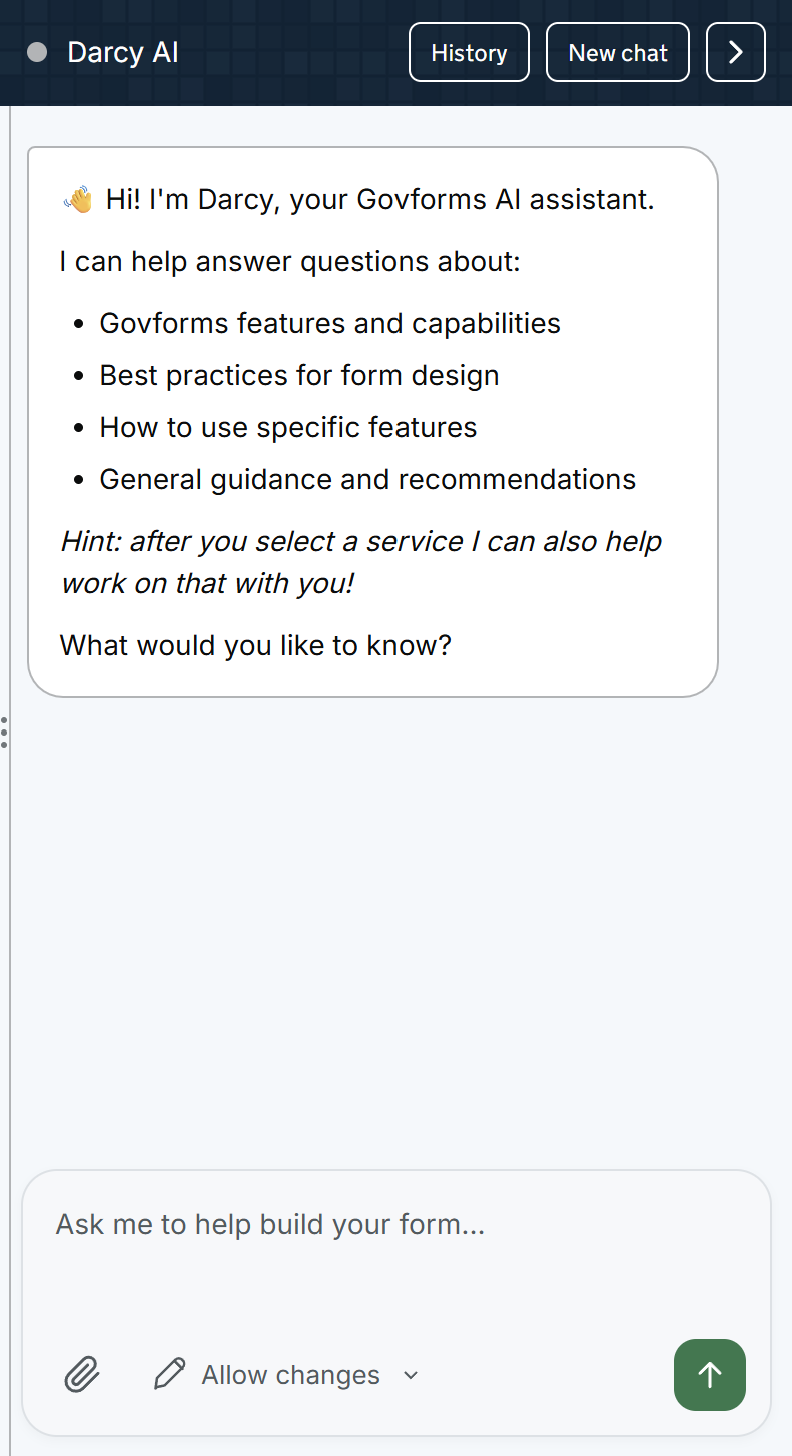
Create from an idea, brief or document, then inspect and improve the service with targeted, permission-aware AI assistance.
Create responsive digital services using established UK government patterns and accessible components.
Adapt each journey using conditional routing, dynamic content and configurable workflow actions.
Add common and complex service functionality using configurable, reusable components.
Securely connect digital services to Microsoft products, APIs, notification services and cloud-storage systems.
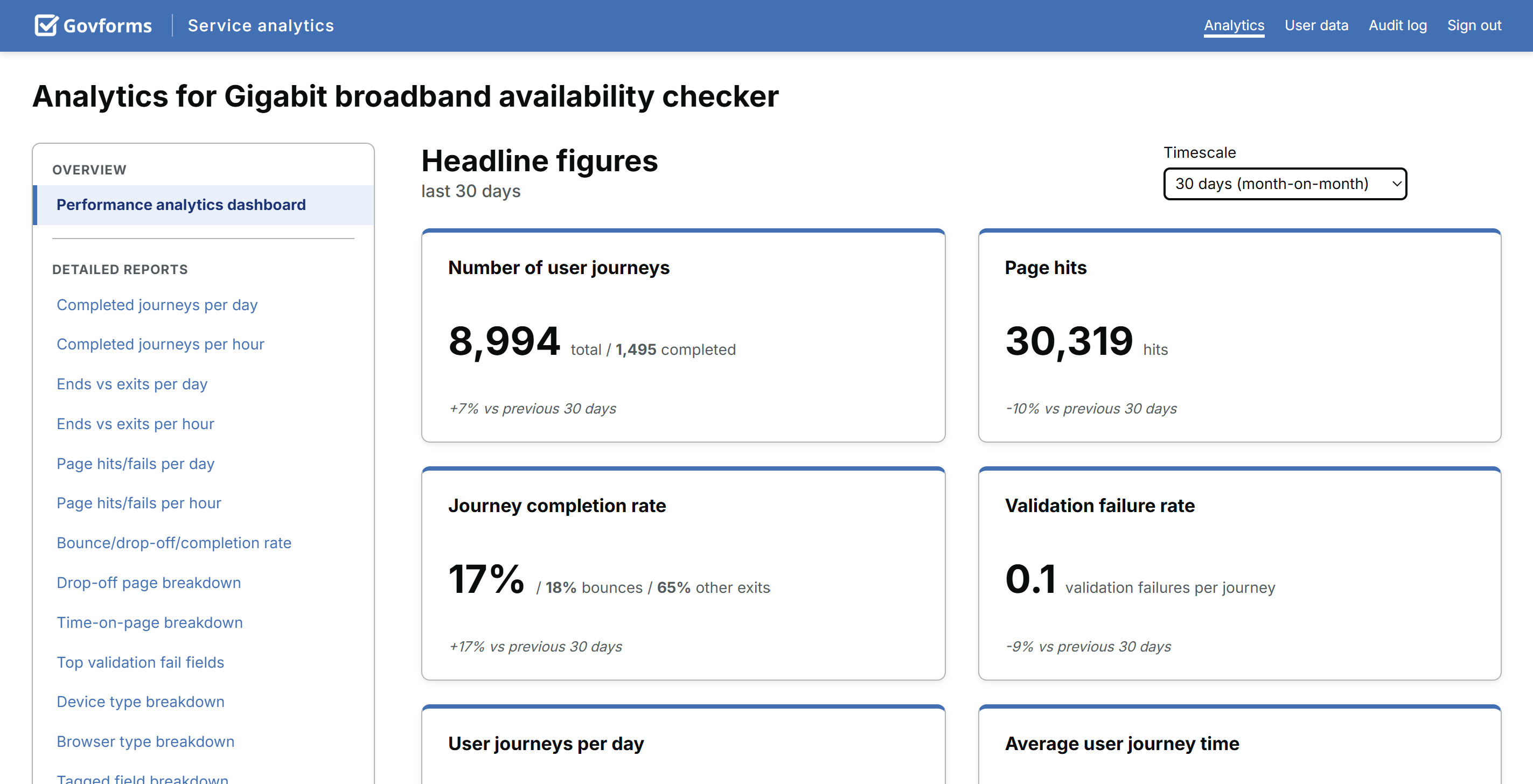
Understand service demand, completion and user behaviour using unsampled, server-side analytics.
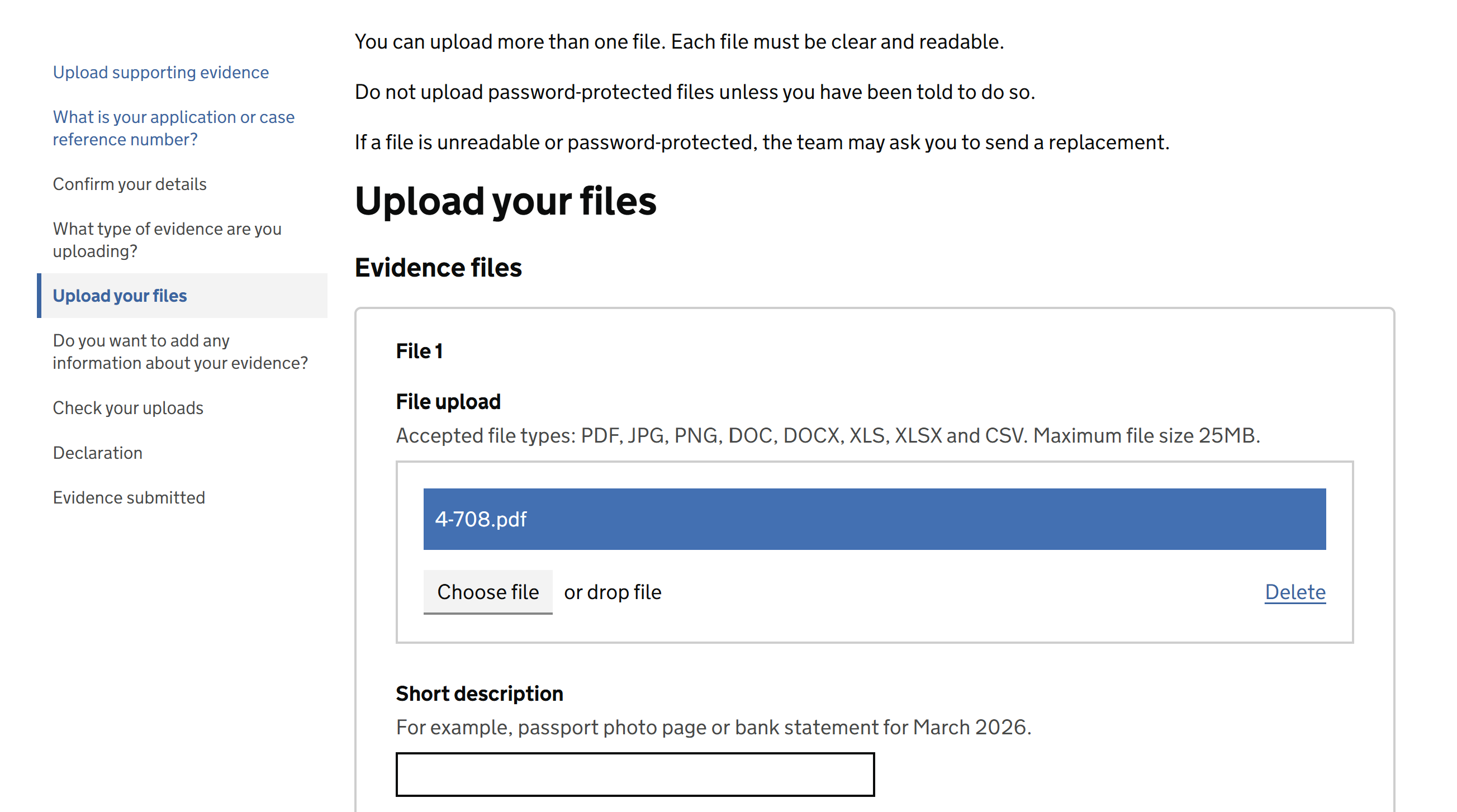
Choose the file checks and privacy controls your service needs, with Govform-managed storage or your own supported file store.
Generate service documents, review and sign PDFs within a journey or prepare agreements in the separate Govform Sign workspace.
Capture accurate UK and international address and location information within a service journey.
Control who can access, complete, review and manage each digital service.
Apply your organisation’s visual identity while retaining accessible, responsive service patterns.
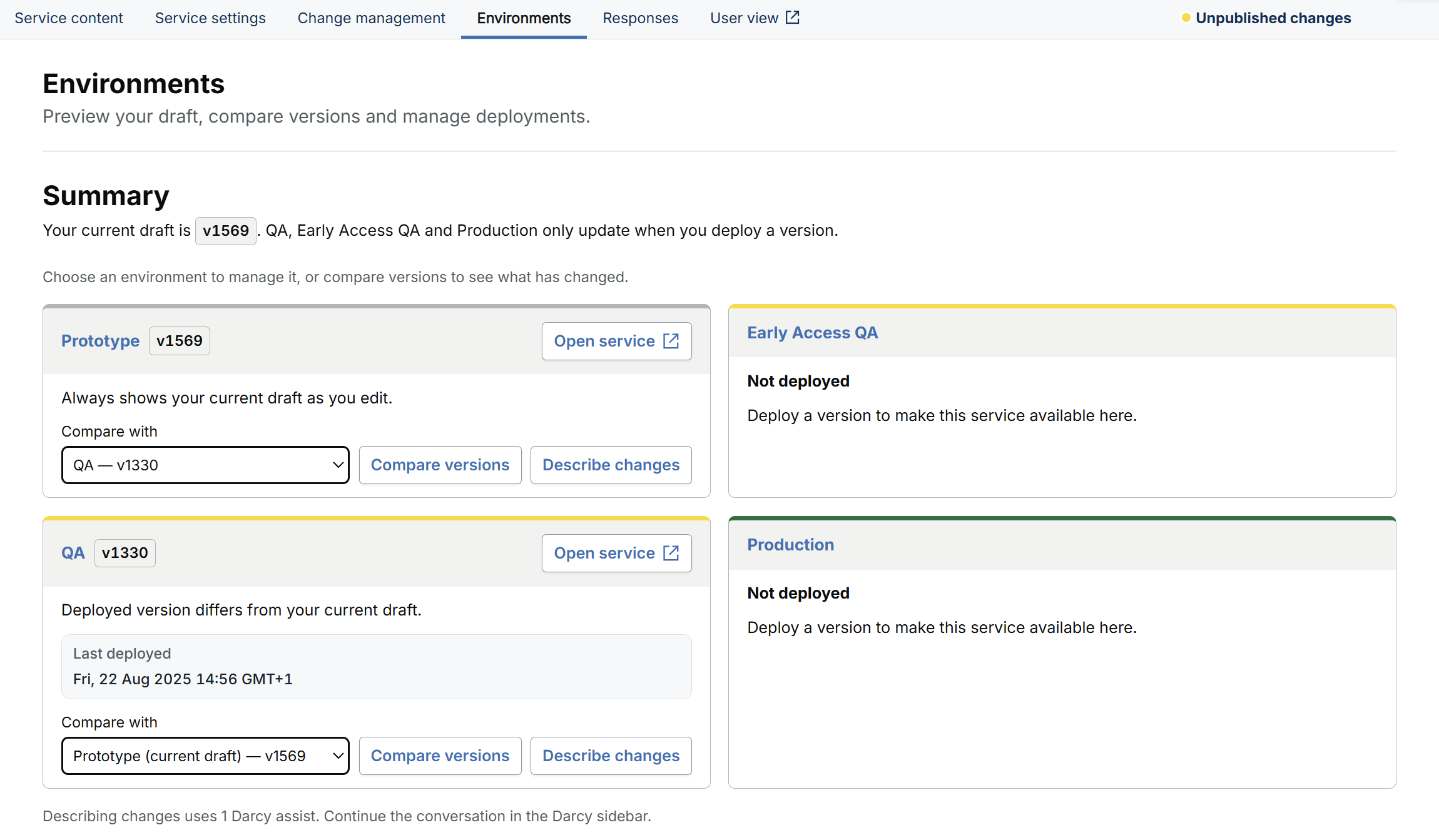
Test safely in Prototype, QA and Early Access QA before releasing to Production. Track every service version, compare changes and revert to an earlier version, with controlled deployment permissions.
Start with the approach that fits your service: blank, reusable or assisted.
Understand the design and investigate what happens in a test journey.
Combine direct tabular entry, linked pages and reusable journeys.
Configure regional behaviour and preview how it appears in a service.
Coordinate domains, service identity and controlled publication.
Search, organise and handle ordinary form responses without creating a Collection programme.
Know who is expected to respond. Coordinate reporting periods, respondents, review and correction.
Collect large CSV or Excel returns with streaming validation and a clear confirmation step.
Your provider. Your money. Payments connected to the response and next step.
One signed-in home for the people you serve: services to start, things to do and everything they’ve sent.
Confirm availability and supported capabilities for your deployment.
Search and filter Govform.com’s complete feature directory to compare platform capabilities and plan availability.
Showing 157 of 157 capabilities
| Feature | Cloud | Cloud Estate | Institutional and Central Government |
|---|---|---|---|
| WCAG 2.2 AA-supporting componentsResponsive components and patterns are designed to support WCAG 2.2 AA conformance. Final accessibility depends on each service’s content, configuration and implementation.Security and compliance | Included | Included | Included |
| Data residency in your geographyUK data residency is available today; EU, USA and Canada are coming soon. Hosting and deployment arrangements depend on the selected plan and hosting model.Security and compliance | Included | Included | Included |
| ISO 27001:2022-certified management systemGovform.com operates an information security management system certified to ISO 27001:2022.Security and compliance | Included | Included | Included |
| Cyber Essentials Plus certificationIndependently verified technical controls support protection against common cyber threats.Security and compliance | Included | Included | Included |
| Drag-and-drop service builderCreate pages, questions and complete service journeys in a visual no-code editor.Build and collaboration | Included | Included | Included |
| Darcy AI AssistantGenerate a structured service from a plain-English description, refine it conversationally and review changes before applying them.Build and collaboration | Included | Included | Included |
| Multi-page service journeysBuild services across multiple pages with navigation, service back links and progress indicators.Build and collaboration | Included | Included | Included |
| Task-list patternGuide users through sections of a complex service with clear completion and progress states.Components | Included | Included | Included |
| Conditional page routingShow or skip pages based on user answers to create branching service journeys.Logic and workflow | Included | Included | Included |
| Dynamic content displayShow relevant questions, content and guidance in response to user input.Logic and workflow | Included | Included | Included |
| Microsoft SharePoint lists and filesRead from and write to SharePoint lists and document libraries during service workflows.Integrations | Included | Included | Included |
| Microsoft Power AutomateTrigger Power Automate flows when a submission is completed or reaches a configured workflow stage.Integrations | Included | Included | Included |
| Configurable REST API clientConnect to HTTP endpoints with configurable requests, responses, authentication, field mapping and Liquid payloads.Integrations | Included | Included | Included |
| GOV.UK Notify email and SMSSend conditional confirmation emails and SMS messages through GOV.UK Notify.Integrations | Included | Included | Included |
| Real-time service analytics dashboardReview starts, completions, drop-offs and service performance separately for QA and Production.Analytics and reporting | Included | Included | Included |
| Page-level drop-off analysisIdentify where users leave a journey and use validation-failure data to investigate friction.Analytics and reporting | Included | Included | Included |
| Analytics without analytics cookiesCollect unsampled service-usage data server-side without relying on analytics cookies.Analytics and reporting | Included | Included | Included |
| Save and returnAllow users to pause a service journey and resume it later using configurable draft modes.Logic and workflow | Included | Included | Included |
| Multiple file uploadsAccept up to 100 files per component, with a configurable per-file ceiling of 20 GB and a 10 MB default. Storage and security processing may impose lower limits; provide view and download links for review.ComponentsRelated documentation: Multiple file uploads | Included | Included | Included |
| Antivirus scanning for uploadsUse configured in-place scanning in Govform storage. For your own supported store, choose scan-first, parallel scanning or your destination's controls without Govform scanning. Current external-store Govform scanning supports transfers up to 5 GB; CDR always scans first.Security and complianceRelated documentation: Antivirus scanning for uploads | Included | Included | Included |
| Document reconstruction and image privacyReconstruct supported documents with Content Disarm and Reconstruction: single-file components, 50 MB default or a lower configured limit. Resize JPEG/PNG images, remove metadata and optionally blur faces through CDR.Security and complianceRelated documentation: Document reconstruction and image privacy | Included | Included | Included |
| G-Cloud procurement routeProcure eligible Govform.com services through the Crown Commercial Service G-Cloud framework.Support and onboarding | Included | Included | Included |
| Crown Commercial Service supplierAccess Govform.com through applicable Crown Commercial Service procurement arrangements.Support and onboarding | Included | Included | Included |
| First-service build supportAsk the Govform.com team to help configure an initial service as part of an agreed onboarding package.Support and onboarding | Included | Included | Included |
| Excel and CSV lookup feedsUse refreshable Excel or CSV files as service lookup data, with separate sources by environment.Integrations | Included | Included | Included |
| Govform.com REST API accessRetrieve submissions and work with supported library resources programmatically using API credentials.Integrations | Included | Included | Included |
| Microsoft DataverseConnect service data to Dataverse tables for Microsoft Power Platform workflows.Integrations | Included | Included | Included |
| Microsoft Power Apps connectorMake service data available to Power Apps for operational applications and workflows.Integrations | Included | Included | Included |
| Calculated fieldsCalculate values from answers and use the results in pages, logic, transformations and integrations.Logic and workflow | Included | Included | Included |
| Data pre-populationPre-fill fields using earlier answers, session data or external API lookups.Logic and workflow | Included | Included | Included |
| Document generationGenerate formatted PDF documents from submitted service data.Logic and workflow | Included | Included | Included |
| Field-level validation rulesApply configurable validation and provide specific, accessible error messages for individual fields.Logic and workflow | Included | Included | Included |
| Liquid templatingUse Liquid templates for dynamic content, conditional blocks, API payloads and email bodies.Logic and workflow | Included | Included | Included |
| Multi-stage review workflowsConfigure sequential approvals, multi-party decisions, corrections, cancellation and withdrawal.Logic and workflow | Included | Included | Included |
| Post-submission actionsTrigger API requests, messages, SharePoint writes and Power Automate flows after submission.Logic and workflow | Included | Included | Included |
| Repeating groupsCapture multiple instances of a structured data set, such as addresses or household members.Logic and workflow | Included | Included | Included |
| Service-to-service linkingConnect related service journeys and pass approved data between them.Logic and workflow | Included | Included | Included |
| Submission data API exportRetrieve submission data through the API for case-management, reporting or business-intelligence systems.Analytics and reporting | Included | Included | Included |
| Power BI reportingFeed submission data into Power BI for operational and management dashboards.Analytics and reporting | Included | Included | Included |
| Submission reviewerSearch, filter, sort, review and export submitted service data inside Govform.com.Analytics and reporting | Included | Included | Included |
| Automatic language translationOffer supported service journeys in multiple languages while retaining their validation, logic and workflows.Build and collaboration | Included | Included | Included |
| Responsive service layoutsDeliver journeys that adapt across mobile, tablet and desktop screen sizes.Build and collaboration | Included | Included | Included |
| Shareable prototype previewsShare service prototypes with stakeholders for review before production deployment.Build and collaboration | Included | Included | Included |
| Three test environments and ProductionBuild and test in Prototype, QA and Early Access QA before a controlled release to Production.Governance and platform management | Included | Included | Included |
| Full version history, comparison and reversionsTrack every service version, compare revisions before release and restore an earlier service version without losing the audit trail.Governance and platform management | Included | Included | Included |
| UK postcode address lookupFind UK addresses from a postcode and map selected address lines into service fields.Components | Included | Included | Included |
| Booking and calendar schedulingLet users select available dates or time slots and receive a booking confirmation.Components | Included | Included | Included |
| Check-your-answers pagesPresent a pre-submission summary with links that let users review and change their answers.Components | Included | Included | Included |
| Submission confirmation pagesShow a configurable confirmation, reference number and clear next steps after submission.Components | Included | Included | Included |
| Declarations and attestationsCapture declarations with associated answers, signatures and audit information.Components | Included | Included | Included |
| Maps and geolocationLet users select a location, capture coordinates and find nearby addresses through an interactive map.Components | Included | Included | Included |
| Payment integrationsTake fees within a service through GOV.UK Pay or your own payment provider's hosted checkout.Components | Included | Included | Included |
| Searchable results tablesPresent paginated results that authorised users can search and filter.Components | Included | Included | Included |
| Shopping-cart and multi-item journeysAllow users to add and manage multiple items within a single service submission.Components | Included | Included | Included |
| Data GridsDirect tabular entry with spreadsheet paste, repeated rows, copying, calculations, conditional visibility and column validation. Separate from bulk CSV or Excel uploads.Components | Included | Included | Included |
| Private cloud or self-hosted deploymentDeploy Govform.com into an agreed private-cloud or customer-controlled hosting environment.Security and compliance | Not included | Not included | Included |
| Contracted disaster recoveryAgree recovery-point and recovery-time objectives as part of an Institutional support arrangement.Governance and platform management | Not included | Not included | Included |
| Cloud object-storage integrationsChoose Govform-managed storage or your own SharePoint, AWS S3, Google Cloud Storage or Azure Blob Storage. Stream evidence and confirmed bulk CSV files onward using separate QA and Production connections.IntegrationsRelated documentation: Cloud object-storage integrations | Included | Included | Included |
| AWS SES emailSend transactional service emails through AWS Simple Email Service.Integrations | Included | Included | Included |
| Post-submission action alertsNotify an operational team when a configured API call or post-submission action fails.Integrations | Included | Included | Included |
| Mutual TLS API authenticationUse client certificates and mutual TLS to secure supported back-office API connections.Integrations | Included | Included | Included |
| Mock API responsesTest integrations with configured mock responses before connecting to live endpoints.Integrations | Included | Included | Included |
| Integration architecture consultancyWork with Govform.com specialists on SharePoint, API and multi-system integration architecture.Support and onboarding | Not included | Not included | Included |
| Enhanced support planAdd contracted response times, a dedicated support contact and agreed service-management arrangements.Support and onboarding | Not included | Not included | Included |
| Platform audit event logReview recorded platform events including actions, errors, workflow decisions and administrative changes.Governance and platform management | Included | Included | Included |
| AWS Well-Architected expertiseDraw on architecture practices informed by the AWS Well-Architected Framework and partner expertise.Security and compliance | Included | Included | Included |
| Encryption at restEncrypt stored submission data, uploaded files and managed backups at rest.Security and compliance | Included | Included | Included |
| Environment isolationSeparate Prototype, QA and Production data, credentials and API connections.Security and compliance | Included | Included | Included |
| ISO 9001:2015-certified quality systemGovform.com operates a quality management system certified to ISO 9001:2015.Security and compliance | Included | Included | Included |
| Regular penetration testingUse independent security testing to identify and address platform vulnerabilities.Security and compliance | Included | Included | Included |
| TLS encryption in transitProtect data in transit using TLS 1.2 or later.Security and compliance | Included | Included | Included |
| AWS Cognito authenticationUse hosted Cognito user pools with configurable authentication and multi-factor controls.Authentication and access | Included | Included | Included |
| Anonymous public accessPublish services that users can complete without signing in.Authentication and access | Included | Included | Included |
| Configurable session timeoutsSet inactivity limits and show users an in-browser warning before sign-out.Authentication and access | Included | Included | Included |
| Passwordless GOV.UK Notify sign-inSend a one-time sign-in link by email without requiring users to manage a password.Authentication and access | Included | Included | Included |
| Group-based submission sharingAllow authorised members of a group to view and collaborate on shared submissions.Authentication and access | Included | Included | Included |
| Multi-factor authentication enforcementRequire supported users or administrators to complete an additional authentication factor.Authentication and access | Included | Included | Included |
| OpenID Connect and OAuth 2.0Connect compatible identity providers, including Microsoft Entra ID and departmental single sign-on.Authentication and access | Included | Included | Included |
| Read-only reviewer accessGive staff, reviewers or caseworkers permission to view submissions without editing them.Authentication and access | Included | Included | Included |
| 99.9% availability targetUse a production platform designed around a 99.9% availability target, subject to the applicable service agreement.Governance and platform management | Included | Included | Included |
| Environment-specific secretsKeep production API keys and credentials separate from Prototype and QA values.Governance and platform management | Included | Included | Included |
| Role-based platform accessAssign granular administrative, build, QA, analytics and read-only permissions.Governance and platform management | Included | Included | Included |
| Library-based organisation modelOrganise services into libraries that reflect teams, departments and access boundaries.Governance and platform management | Included | Included | Included |
| Library-level MFA policiesRequire multi-factor authentication for users who access a selected service library.Governance and platform management | Included | Included | Included |
| Managed backupsUse automated backups for supported service data and configuration under the applicable service plan.Governance and platform management | Included | Included | Included |
| Service duplication and migrationCopy services between libraries to support reuse, restructuring and team migration.Governance and platform management | Included | Included | Included |
| Brand configuration serviceAsk the Govform.com team to configure a theme that reflects your organisation’s agreed visual identity.Support and onboarding | Included | Included | Included |
| Help centre and documentationAccess product documentation, examples and practical guides for features and components.Support and onboarding | Included | Included | Included |
| Proactive platform monitoringMonitor platform health and alert operational teams when service degradation is detected.Support and onboarding | Included | Included | Included |
| UK-based live-service supportAccess support from a UK-based team through the channels included in your service agreement.Support and onboarding | Included | Included | Included |
| Ordnance Survey Maps APIUse licensed Ordnance Survey mapping and geographic reference data in supported UK location journeys.Integrations | Included | Included | Included |
| Multi-party authorisationRequire a configured number of reviewers, or every reviewer, to approve a workflow stage.Logic and workflow | Included | Included | Included |
| Device and browser reportingCompare service usage and performance across device types, operating systems and browsers.Analytics and reporting | Included | Included | Included |
| Tagged-field analyticsTag selected fields to analyse response patterns and the choices users make during a journey.Analytics and reporting | Included | Included | Included |
| Validation-failure reportingIdentify the fields that produce the most validation errors across service journeys.Analytics and reporting | Included | Included | Included |
| Collaborative commentsAdd contextual comments to pages and review changes with multiple service collaborators.Build and collaboration | Included | Included | Included |
| Custom CSS and Sass overridesApply advanced stylesheet overrides for specialist branding and implementation requirements.Build and collaboration | Included | Included | Included |
| Custom branding and themesConfigure colours, typography, logos, headers and footers for a consistent service identity.Build and collaboration | Included | Included | Included |
| Custom production domainsPublish a service under an approved organisation or departmental domain.Build and collaboration | Included | Included | Included |
| Reusable page templatesSave and reuse pages, patterns and shared design-library elements across services.Build and collaboration | Included | Included | Included |
| Accessible date inputCapture day, month and year using an accessible date pattern with configurable validation.Components | Included | Included | Included |
| Service creation optionsCreate blank services or use templates, configurable starters, document-assisted creation, an idea brief or starters for regular returns.Build and collaborationRelated documentation: Service creation options | Included | Included | Included |
| Liquid visualisationVisualise Liquid while authoring service behaviour.Logic and workflowRelated documentation: Liquid visualisation | Included | Included | Included |
| Authoring preview and selectionClearer preview and selection interfaces support authoring and review.Build and collaborationRelated documentation: Authoring preview and selection | Included | Included | Included |
| Check your answers layoutsImproved Check your answers layouts help organise the information respondents review.ComponentsRelated documentation: Check your answers layouts | Included | Included | Included |
| Flow viewUnderstand service structure through the generated Flow view.Build and collaborationRelated documentation: Flow view | Included | Included | Included |
| Flow InspectorRecord a real test journey, explain routes, page stops, actions, conditions and validation, and link observed behaviour to Builder settings. Flow simulation does not prove external action success.Build and collaborationRelated documentation: Flow Inspector | Included | Included | Included |
| Linked supporting pagesLink supporting pages into a service journey.ComponentsRelated documentation: Linked supporting pages | Included | Included | Included |
| Journey Select tablesUse Journey Select tables with sorting and pagination.ComponentsRelated documentation: Journey Select tables | Included | Included | Included |
| Embedded multi-page formsReuse embedded multi-page forms. Production release conditions still apply to the service and target environment.ComponentsRelated documentation: Embedded multi-page forms | Included | Included | Included |
| Regional formats and previewSet library country, regional date/number formats, currency and service time zone; preview regional behaviour. Changes do not translate content, convert stored money or rewrite saved deadlines.Governance and platform managementRelated documentation: Regional formats and preview | Included | Included | Included |
| Regional address and date behaviourInherited date/address behaviour, country-aware address search and regional postal-code labels. Confirm supported options for the deployment.ComponentsRelated documentation: Regional address and date behaviour | Included | Included | Included |
| Service time-zone formattingUse the service time zone for Liquid date/time formatting and background-generated content. Saved deadlines are not rewritten by regional changes.Logic and workflowRelated documentation: Service time-zone formatting | Included | Included | Included |
| Translation improvementsWork with translation improvements separately from regional configuration. Regional settings do not translate service content; confirm supported options.Build and collaborationRelated documentation: Translation improvements | Included | Included | Included |
| Guided domain provisioningGuided DNS setup, validation and provisioning status, and managed certificates for custom domains. Cloud domain allowances are pooled across the account and may be increased on request. Institutional plans have no domain cap.Governance and platform managementRelated documentation: Guided domain provisioning | Included | Included | Included |
| Email and interaction brandingEmail branding plus focus and visited-link theme options.Build and collaborationRelated documentation: Email and interaction branding | Included | Included | Included |
| Shared library settings publicationPublication status for supported shared library settings, including update and retry status.Governance and platform managementRelated documentation: Shared library settings publication | Included | Included | Included |
| Main and Early Access channelsMain and Early Access share Builder authoring data. Production remains separately controlled. Early Access requires eligible, enabled access.Governance and platform managementRelated documentation: Main and Early Access channels | Included | Included | Included |
| Payment providersConnect your own merchant account across Stripe, Worldpay, Adyen, PayPal, PaySuite, Global Payments and GOV.UK Pay. Setup is confirmed for your account.IntegrationsExplore payments | Included | Included | Included |
| Calculated fees and exemptionsFixed amounts or fees calculated from answers, condition-based exemptions, provider-supported currencies and per-account amount limits. A calculated zero needs no payment.Components | Included | Included | Included |
| Hosted checkout and payment recoveryPayment summary after the final submit, provider-hosted checkout, retry after decline or cancellation, signed-in resume and background checks with the provider.Components | Included | Included | Included |
| Response Hub payment caseworkAwaiting payment list, payment history, checking and cancelling payments, waivers and recording payments taken by telephone or in person, with confirmation and staff audit.Analytics and reporting | Included | Included | Included |
| User portalA signed-in homepage that brings together the services and Collection programmes you choose with each person’s saved work, returned forms and submissions.Authentication and accessExplore payments | Included | Included | Included |
| Simulated payment testingSimulated checkout for every outcome in preview, QA and Staging until account setup is complete. Production never simulates.Build and collaboration | Included | Included | Included |
| Response Hub registersService and environment registers; search by reference, name or email; date, processing, owner, team-status and tag filters; sorting and pagination.Analytics and reporting | Included | Included | Included |
| Response Hub answer columns and saved viewsSelect up to 20 answer columns, including current and historic fields, and save working views.Analytics and reporting | Included | Included | Included |
| Response Hub team handlingOwners, tags, dated internal notes and New, In progress or Complete staff states, separate from automated processing.Analytics and reporting | Included | Included | Included |
| Response Hub activity summariesFiltered counts, activity over time, field summaries and choice breakdowns. Asynchronous preparation and last-updated status are visible.Analytics and reporting | Included | Included | Included |
| Response Hub submitted history and evidenceNumbered retained versions, answers and form revisions, amendment history, files, images, signatures and generated documents, subject to access and retention.Analytics and reporting | Included | Included | Included |
| Response Hub scoped exportsSelected or filtered CSV/JSON exports; current or retained versions; current/historic fields; labels or choice identifiers. Larger exports prepare in the background for ZIP download.Analytics and reporting | Included | Included | Included |
| Response Hub access controlsAccess is controlled by library, service, environment and role.Analytics and reporting | Included | Included | Included |
| Collection programme setupProgramme defaults and one or more Collections, each with a form, timetable, important dates and amendment rules. Defaults do not automatically change existing Collections.Analytics and reporting | Included | Included | Included |
| Collection expected respondentsRespondent organisations, authorised contacts, response groups and assignments recording what is expected.Analytics and reporting | Included | Included | Included |
| Collection roster importsPreview respondent roster changes before applying an import.Analytics and reporting | Included | Included | Included |
| Collection progress and dashboardsRespondent dashboards, progress counts and outstanding-return identification.Analytics and reporting | Included | Included | Included |
| Collection reminders and communicationsReminders and retained communication records.Analytics and reporting | Included | Included | Included |
| Collection review and correctionsShared queue, reviewer claiming, reassignment and release; field or spreadsheet-cell issues, return for correction and acceptance. Separate from in-service review.Analytics and reporting | Included | Included | Included |
| Collection exports, audit and retentionOperational exports, audit records and deployment-specific retention arrangements.Analytics and reporting | Included | Included | Included |
| Collection permission-aware API and AI accessAuthorised API access and AI assistance, subject to permissions.Analytics and reporting | Included | Included | Included |
| Bulk dataset structure and validationValidate up to five million data cells across up to 200 configured columns, with required values, types, ranges and uniqueness rules.ComponentsRelated documentation: Bulk dataset structure and validation | Included | Included | Included |
| Bulk CSV and Excel uploadsStructured CSV or Excel uploads within a digital service, including worksheet selection for Excel.Components | Included | Included | Included |
| Bulk background processingStream CSV or selected XLSX worksheet rows through background validation, with visible progress, a preview and downloadable error reports. Stream confirmed files onward through storage actions or the API.ComponentsRelated documentation: Bulk background processing | Included | Included | Included |
| Bulk optional browser correctionCorrect supported values in spreadsheet-style batches of up to 1,000 rows, then review and confirm the return.Components | Included | Included | Included |
| Bulk review and confirmationReview the uploaded dataset before explicit confirmation.Components | Included | Included | Included |
| Bulk versions and source evidenceVersioned bulk returns and retained source-file evidence, subject to access and retention configuration.Components | Included | Included | Included |
| PDF template preparationMap service answers to existing PDF positions; repeating data and adjustable mapped boxes where configured.Logic and workflow | Included | Included | Included |
| In-service PDF reviewBrowser review with editable or read-only mapped values and configured print/save controls; questions-first or PDF-led journeys.Logic and workflow | Included | Included | Included |
| In-service signature capture and evidenceTyped or drawn signature capture with retained completed-document and signature evidence. Separate from Govform Sign.Logic and workflow | Included | Included | Included |
| Configured PDF cryptographic sealingCryptographic sealing where configured, distinct from visible signatures and with no legal-validity assurance.Logic and workflow | Included | Included | Included |
| Govform Sign agreement workspaceSeparate sender preparation, signing-field placement, invitations and focused recipient review and signing. Up to five signers per agreement.Logic and workflow | Included | Included | Included |
| Govform Sign tracking and evidenceCompletion tracking, recovery or resend, and retention of completed PDFs and associated evidence, subject to configuration and retention settings.Logic and workflow | Included | Included | Included |
| Govform ChatGPT appSupported connected AI access to permitted designs and Collection operations through separate per-library grants, bounded by the current user role.Build and collaboration | Included | Included | Included |
| Govform MCPDiscover permitted libraries, inspect and update designs, prepare deployment changes and perform permitted Collection operations. Sensitive changes require confirmation.Build and collaboration | Included | Included | Included |
| Darcy targeted service changesCreate from briefs or documents and update pages, fields, content, logic and actions, with focused questions, progress feedback and human review.Build and collaboration | Included | Included | Included |
| Darcy service inspectionInspect Builder context, service settings, saved versions, recorded deployments, prototype journeys and generated flow. Recorded status is not a live health guarantee.Build and collaboration | Included | Included | Included |
| Darcy conversation continuityRetain and restore conversations and support longer conversations through compaction.Build and collaboration | Included | Included | Included |
| AI access grants and confirmationSeparate design and Response Hub grants: no access, read-only or full. Current roles remain the ceiling; read-only cannot mutate and sensitive changes require confirmation.Build and collaboration | Included | Included | Included |