
Govform.com
Digital service platform

Everything you need to design, build and run a digital service

Design accessible user journeys, automate complex workflows and securely connect services to the systems your organisation already uses.

Start with a form, grow it into a service and give your team what they need to handle the work that follows.

Platform capabilities

One platform for the complete digital service lifecycle

Build straightforward online forms or complex, multi-stage digital services without assembling and maintaining multiple disconnected tools. Govform.com combines accessible service design, workflow automation, integrations, analytics and governance in one flexible platform.

01

Darcy AI assistant

Describe what you need, or upload an existing form, and Darcy, Govform’s built-in AI, drafts a working service. Then ask it to make changes or suggest improvements.

  • Drafts a service from a brief or document
  • Explains and improves existing services
  • Your team approves every change
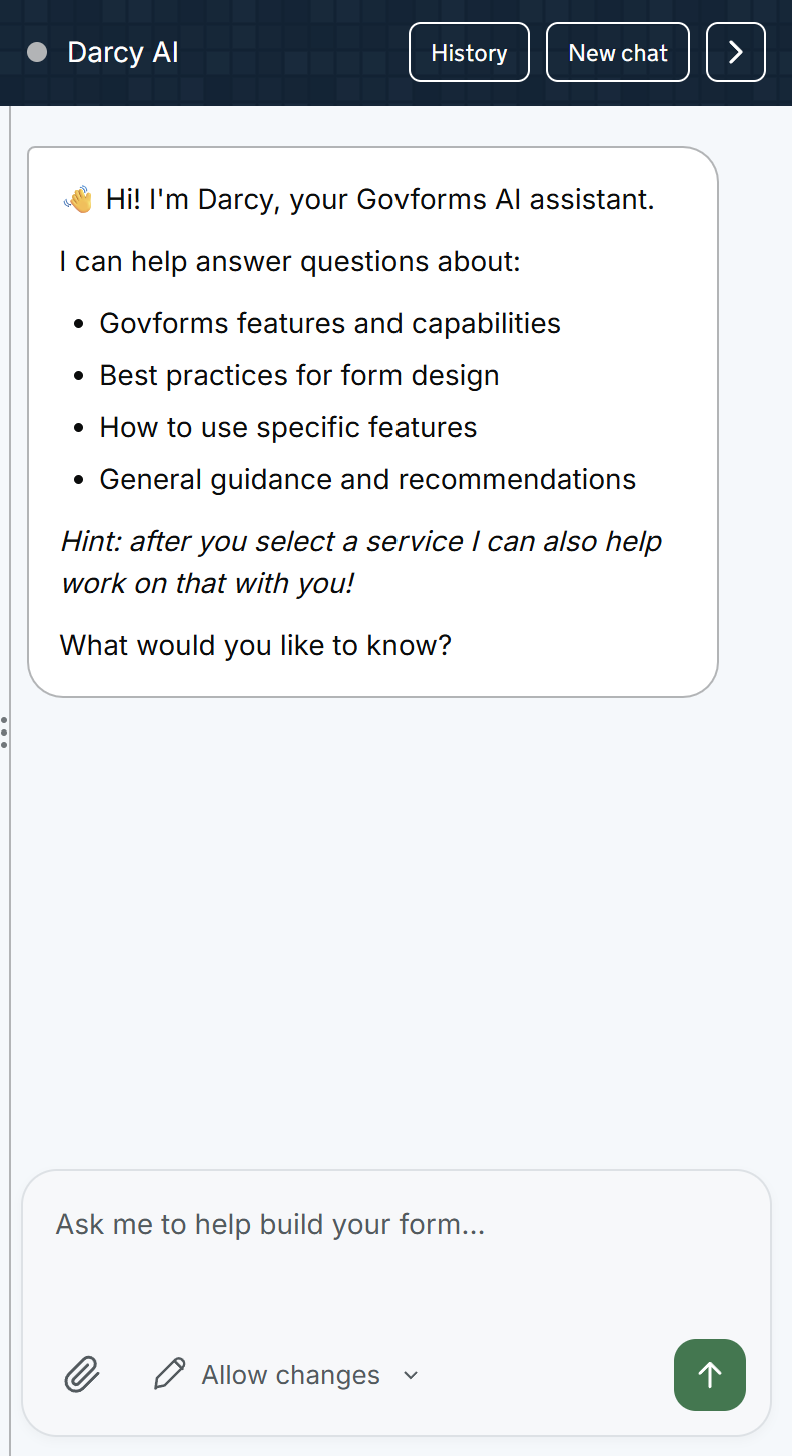
Darcy suggesting two improvements to a grant application
02

Accessible service design

Build services that people can complete on any device, using accessible, well-proven design patterns.

03

Conditional logic and workflow automation

Ask people only the questions that apply to them, and automate what happens after they press send.

04

Reusable service components

Use ready-made building blocks for common tasks, from finding an address to taking a payment.

05

Integrations and connected services

Connect services to the systems your teams already use, including Microsoft 365, your own APIs, email and cloud storage.

06

Digital service analytics

See how many people start and finish your service, and where they get stuck, without analytics cookies.

  • Completion and drop-off reporting
  • The pages and questions that cause problems
  • No analytics cookies
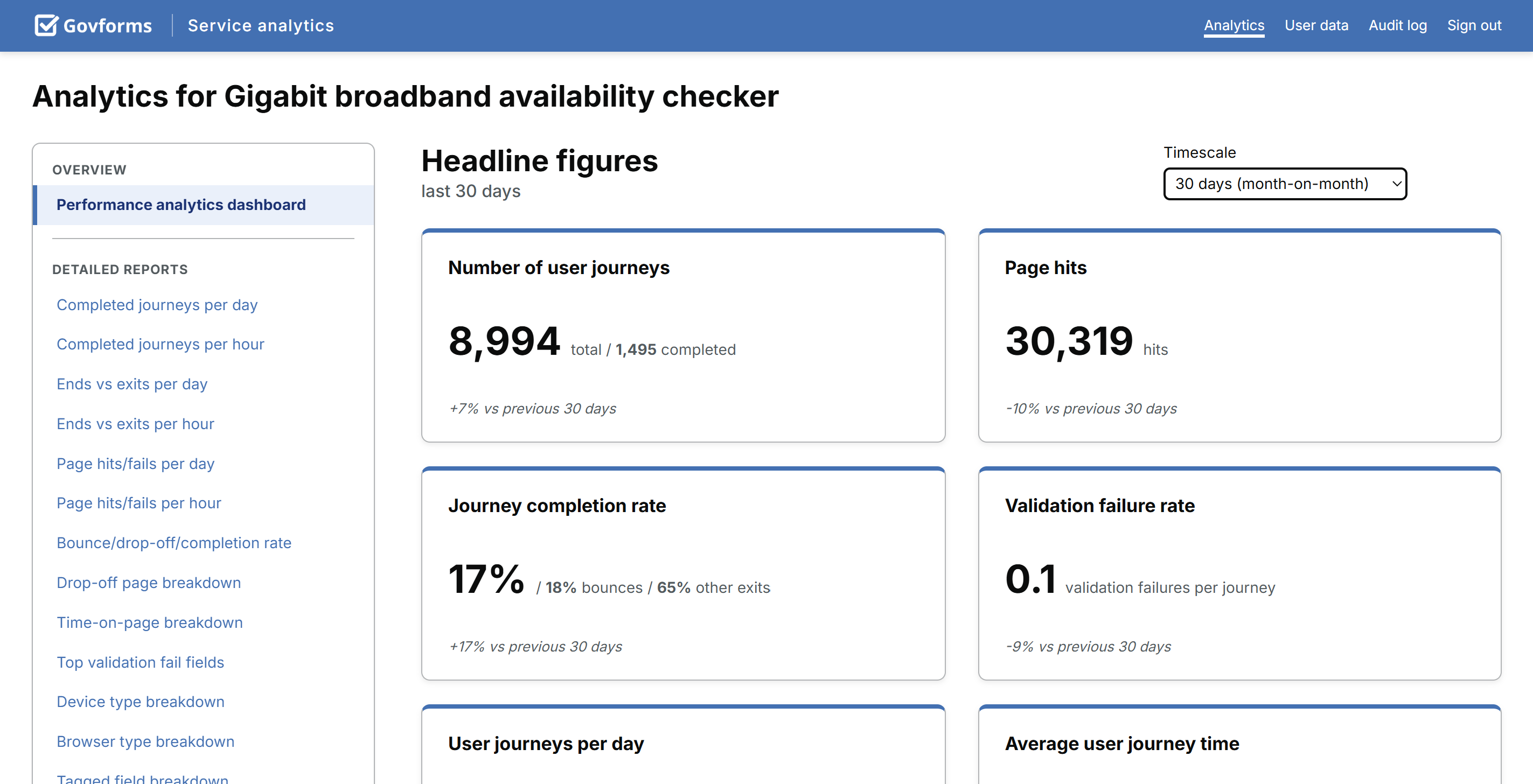
Analytics headline figures for journeys, completion rate, validation failures and journey time
07

Secure document processing

Check uploaded files for threats and protect people’s privacy, with files stored by Govform or in your own storage.

  • Rebuilds documents to remove hidden threats
  • Virus scanning and link checking
  • Separate, isolated processing
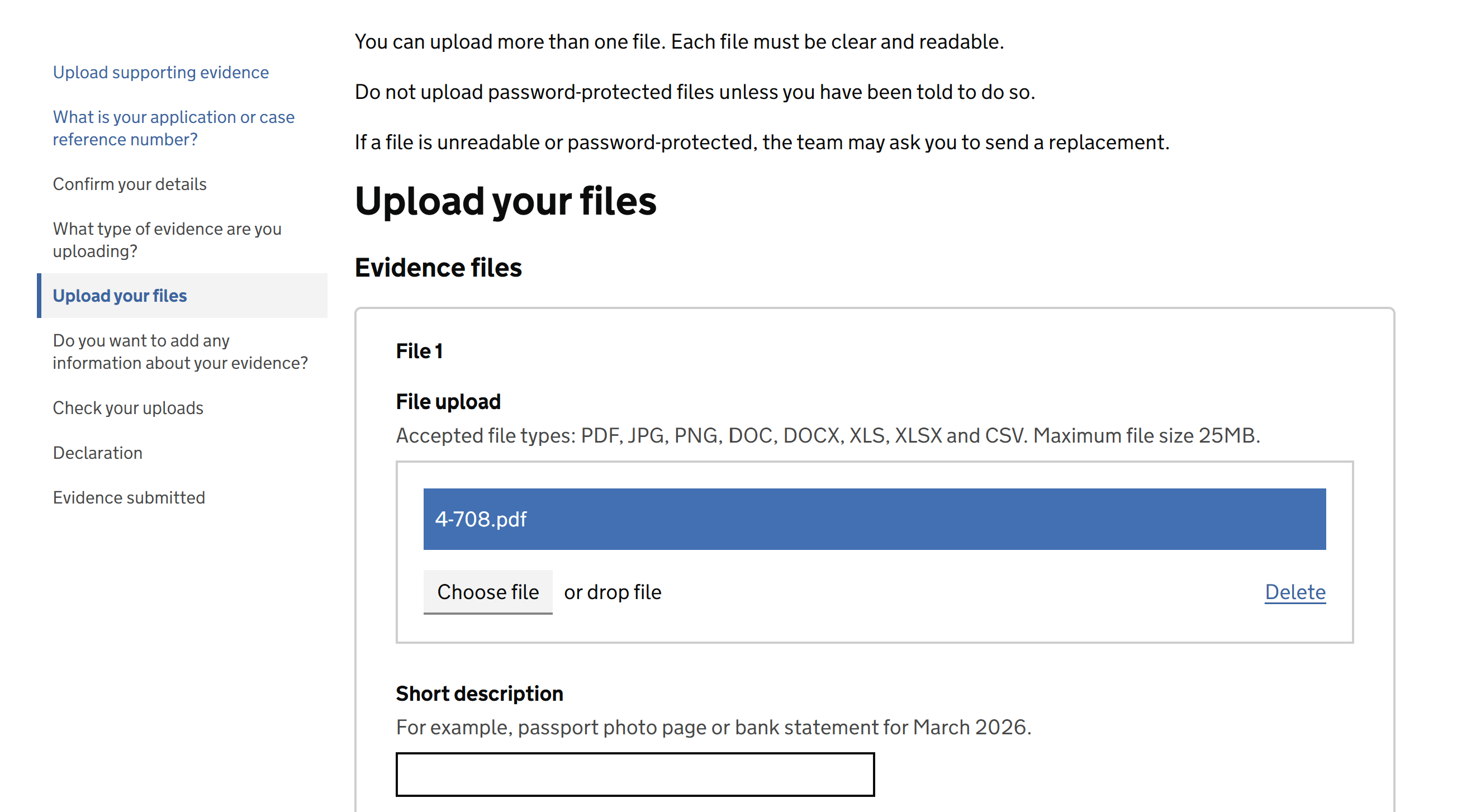
A photo upload in a service, with a reviewed and accepted status
08

Document generation and signing

Create ready-to-use documents from people’s answers, help them review and sign, and track agreements through to completion.

09

Addresses, maps and location

Help people give an accurate address or point to a place on a map, in the UK or abroad.

10

Authentication and access control

Decide who can use each service, and who can see, review and manage the responses.

11

Branding and design control

Make every service look like it comes from your organisation, while keeping it accessible on every device.

12

Test environments and change management

Try changes safely before the public sees them. Test in separate environments, see what changed between versions and roll back if you need to.

  • Separate test environments before going live
  • Full version history and roll-back
  • Control over who can publish
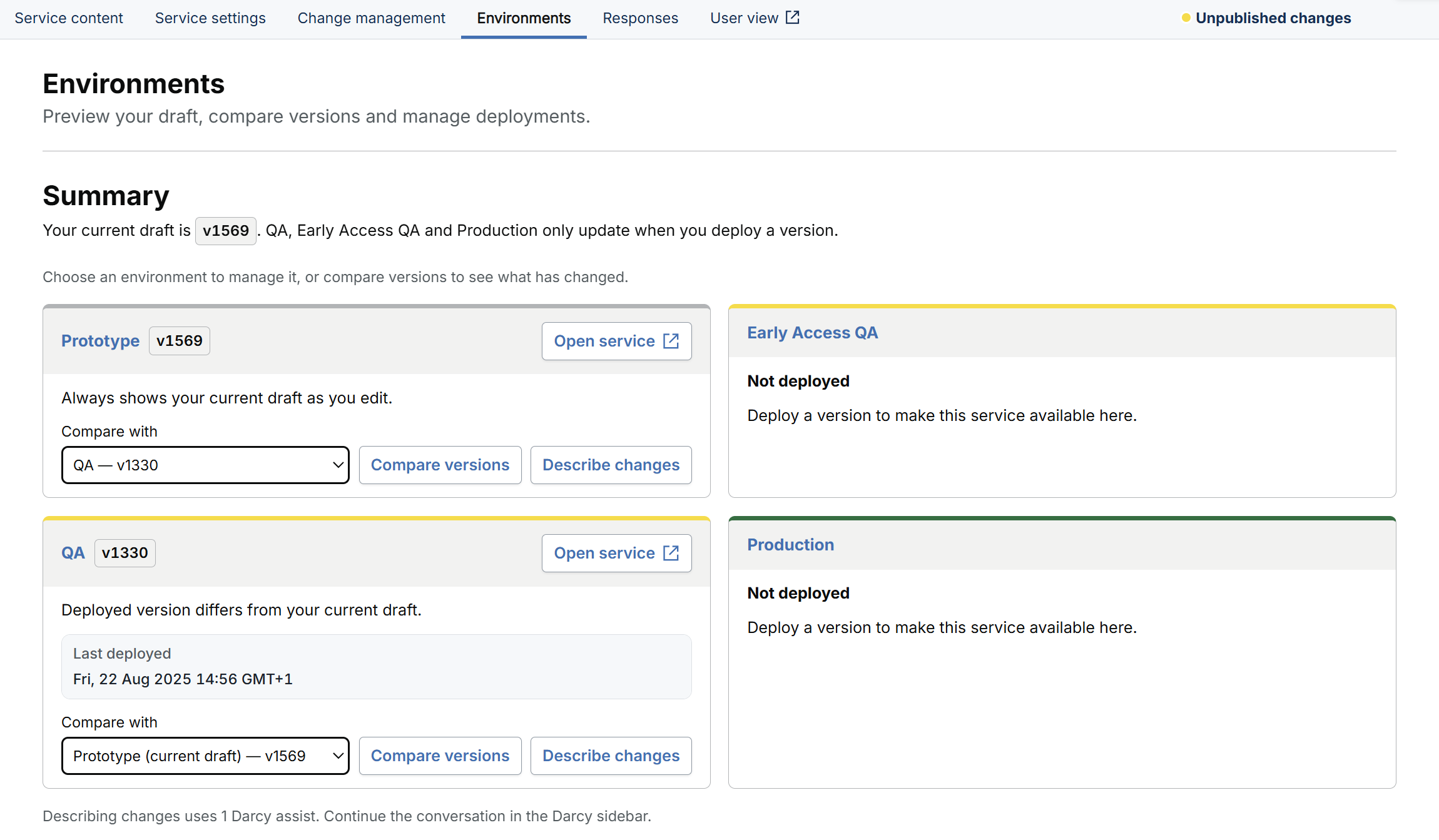
Environments page showing the version in each test and live environment
13

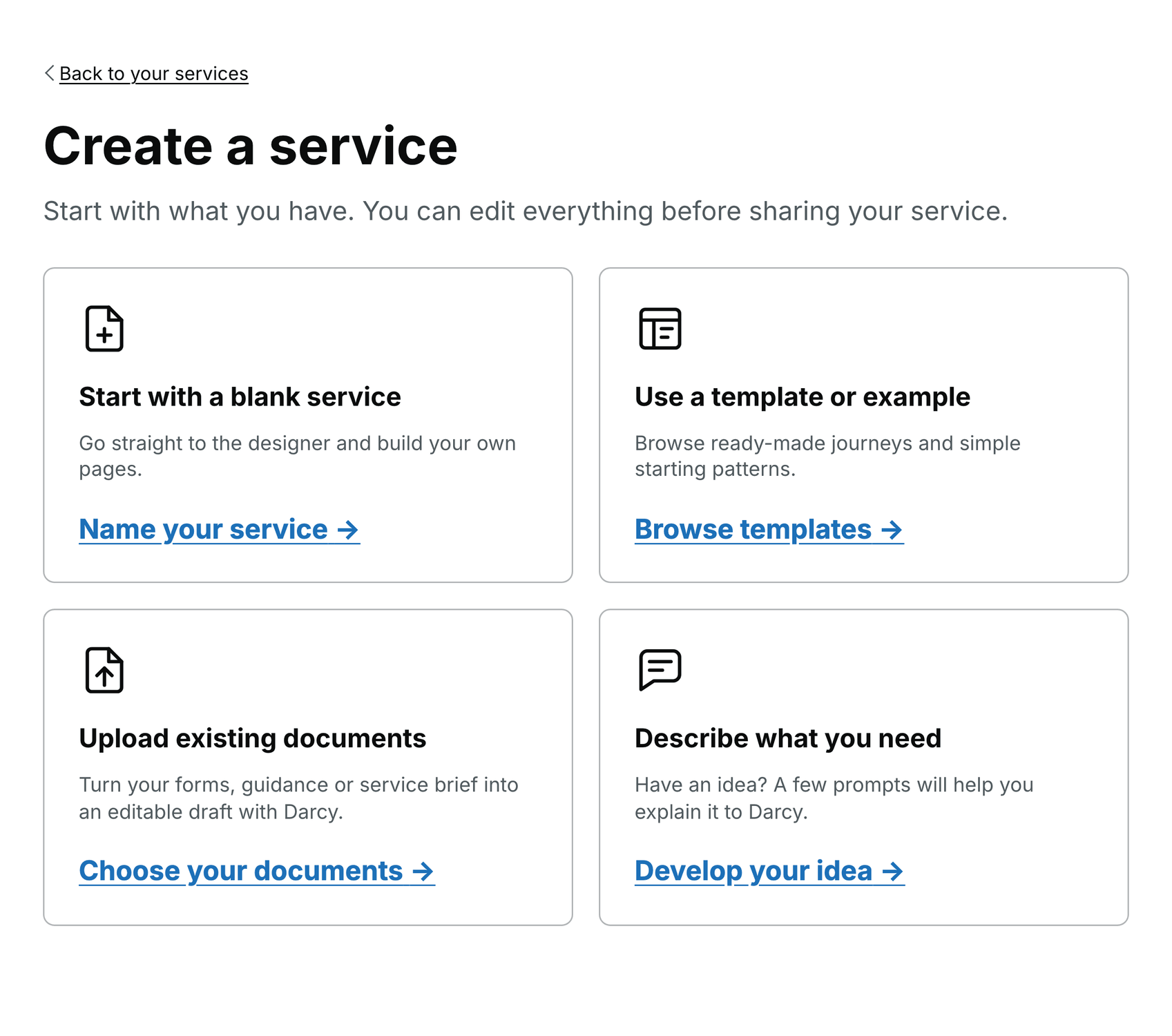
Service creation options

Start from a blank page, a ready-made template or an existing document, or describe what you need and let Darcy draft it.

  • Blank services and ready-made templates
  • Drafts from your documents or ideas
Create a service: start blank, use a template, upload existing documents or describe what you need to Darcy
14

Build and test

See how your service fits together, test it as a user would and fix problems before people rely on the live service.

15

Advanced journeys

Guide people through longer, more complex tasks, with easier ways to enter tables of information.

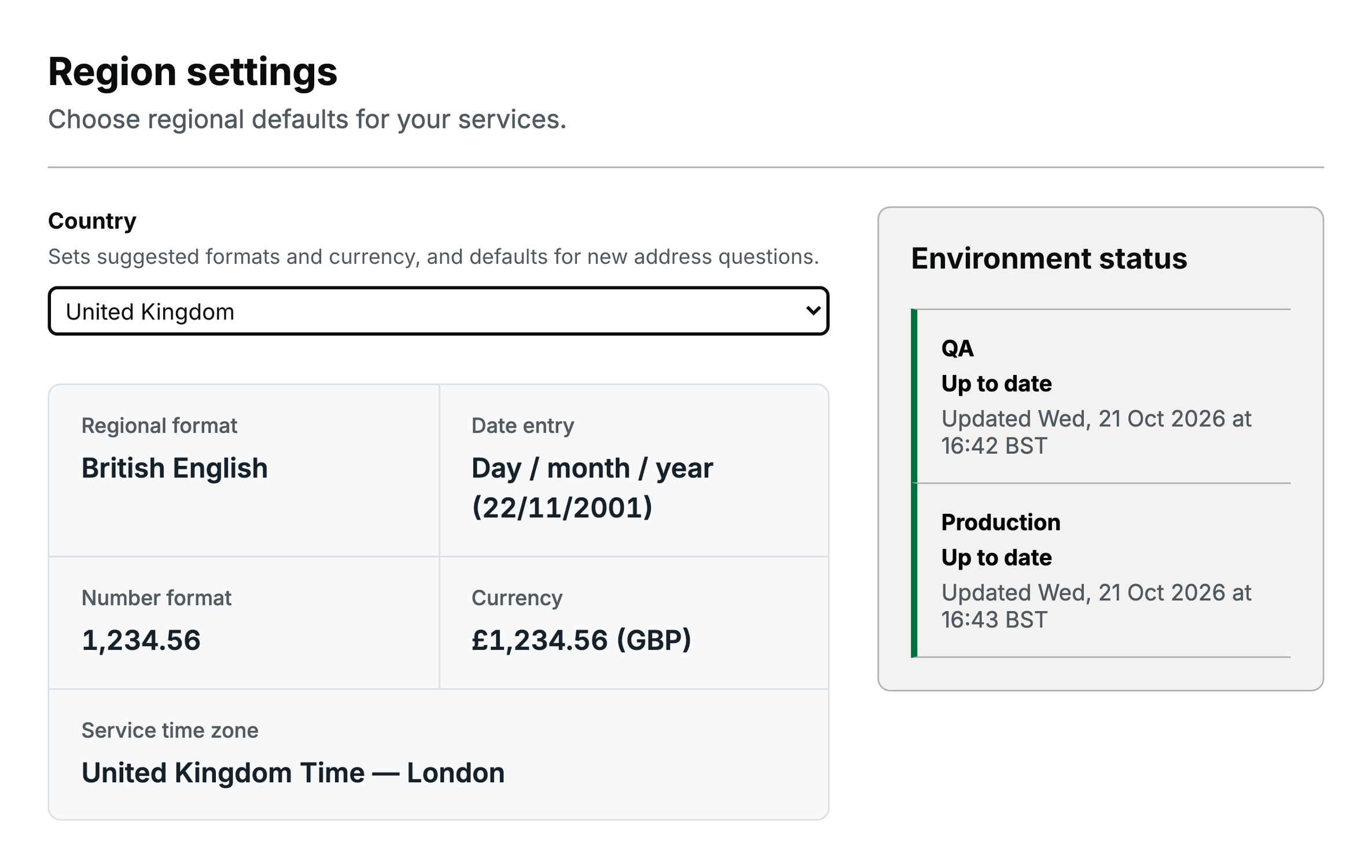
16

International and regional services

Show dates, numbers, money and addresses the way people expect, wherever your service operates.

  • Local date, number and currency formats
  • Addresses and time zones for each country
Region settings showing date, number, currency and time-zone formats, with environment status
17

Branding and publication

Launch under your own web address, with time to test and review changes before they go live.

18

Response Hub

Find the right application, give it an owner and help colleagues take the next step.

19

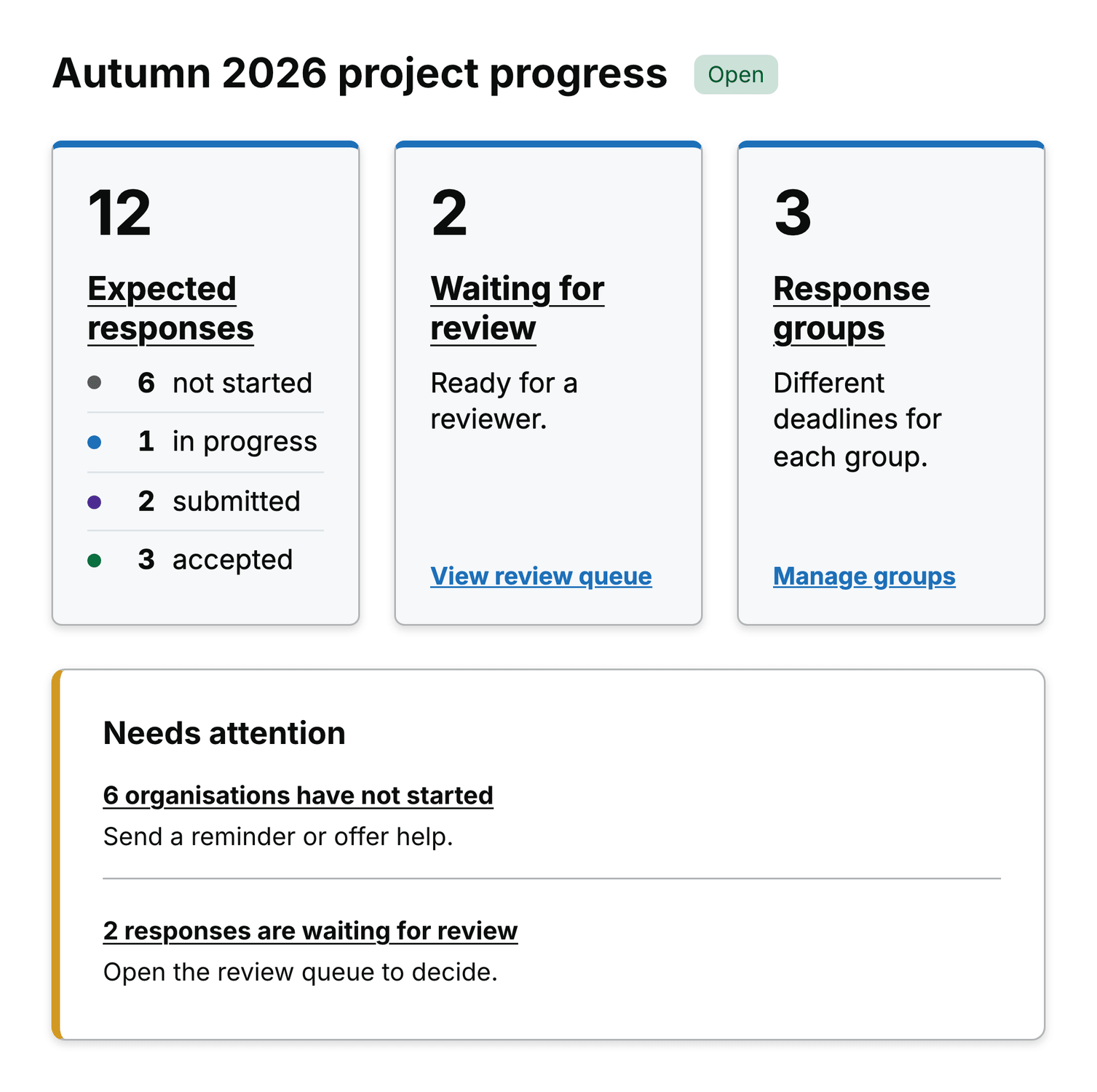
Collection programmes

See who still needs to report and help organisations send the information you need.

  • A shared view of every reporting round
  • Follow up missing returns and corrections
Reporting progress showing expected responses by status, the review queue and what needs attention
20

Bulk data collection

Collect spreadsheet returns and help people fix errors before they submit, so your team spends less time checking files.

21

Payments

Your provider. Your money. Payments connected to the application and what happens next.

22

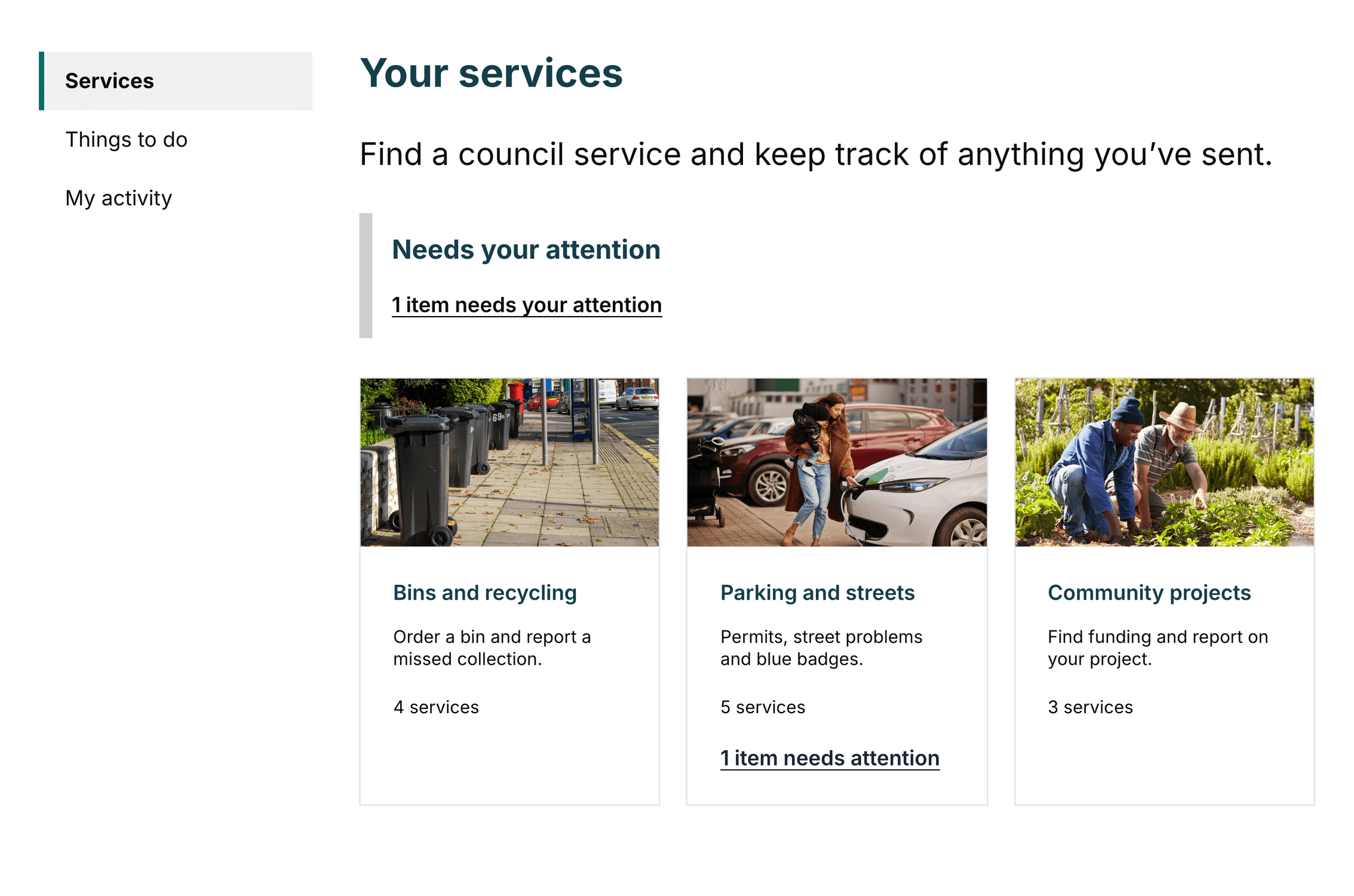
User portal

One signed-in home for the people you serve: services to start, things to do and everything they’ve sent.

  • Services, Things to do and My activity
  • Your branding, sign-in and web address
User portal homepage with Services, Things to do and My activity, and photographic category cards
23

Plans and availability

Most features are included in every plan. A few need extra set-up or are still in trials, so we’ll confirm them with you.

Frequently asked questions

Govform.com platform questions

Compare capabilities

Find the features your service needs

Search and filter Govform.com’s complete feature directory to compare platform capabilities and plan availability.

Filter by category

Showing 156 of 156 capabilities

FeatureCloudCloud EstateInstitutional and Central Government
WCAG 2.2 AA-supporting componentsComponents work on any device and are built to support WCAG 2.2 AA, the widely used accessibility standard. A service’s overall accessibility also depends on its content and set-up.Security and complianceIncludedIncludedIncluded
Data residency in your geographyUK data residency is available today; EU, USA and Canada are coming soon. Hosting and deployment arrangements depend on the selected plan and hosting model.Security and complianceIncludedIncludedIncluded
ISO 27001:2022-certified management systemGovform.com operates an information security management system certified to ISO 27001:2022.Security and complianceIncludedIncludedIncluded
Cyber Essentials Plus certificationIndependently verified technical controls support protection against common cyber threats.Security and complianceIncludedIncludedIncluded
Drag-and-drop service builderCreate pages, questions and complete service journeys in a visual no-code editor.Build and collaborationIncludedIncludedIncluded
Darcy AI AssistantGenerate a structured service from a plain-English description, refine it conversationally and review changes before applying them.Build and collaborationIncludedIncludedIncluded
Multi-page service journeysBuild services across as many pages as you need, with back links and progress indicators.Build and collaborationIncludedIncludedIncluded
Task listsBreak long applications into sections that people can complete in any order, with clear progress.ComponentsIncludedIncludedIncluded
Conditional page routingShow or skip pages based on user answers to create branching service journeys.Logic and workflowIncludedIncludedIncluded
Dynamic content displayShow relevant questions, content and guidance in response to user input.Logic and workflowIncludedIncludedIncluded
Microsoft SharePoint lists and filesRead from and write to SharePoint lists and document libraries during service workflows.IntegrationsIncludedIncludedIncluded
Microsoft Power AutomateTrigger Power Automate flows when a submission is completed or reaches a configured workflow stage.IntegrationsIncludedIncludedIncluded
Connections to your own APIsConnect to your systems’ APIs, with configurable requests, responses, sign-in and data mapping.IntegrationsIncludedIncludedIncluded
Email and text message notificationsSend confirmation emails based on people’s answers. Text messages are available for eligible UK public-sector services.IntegrationsIncludedIncludedIncluded
Real-time service analytics dashboardSee starts, completions, drop-offs and performance, with separate figures for testing and the live service.Analytics and reportingIncludedIncludedIncluded
Page-level drop-off analysisSee where people leave a journey, and which questions cause the most errors.Analytics and reportingIncludedIncludedIncluded
Analytics without analytics cookiesUsage data is collected on Govform’s servers, not through analytics cookies, and is never sampled.Analytics and reportingIncludedIncludedIncluded
Save and returnLet people save their progress and come back to finish later.Logic and workflowIncludedIncludedIncluded
Multiple file uploadsAccept up to 100 files per question, each up to 20 GB (10 MB by default). Your storage and security checks may set lower limits. Reviewers can view and download every file.ComponentsRelated documentation: Multiple file uploadsIncludedIncludedIncluded
Antivirus scanning for uploadsScan uploaded files for viruses, whether they are stored by Govform or in your own storage. Scanned transfers to your own storage can be up to 5 GB.Security and complianceRelated documentation: Antivirus scanning for uploadsIncludedIncludedIncluded
Document reconstruction and image privacyRebuild supported documents to strip out hidden threats (content disarm and reconstruction), for files up to 50 MB by default. Resize photos, remove hidden metadata and optionally blur faces.Security and complianceRelated documentation: Document reconstruction and image privacyIncludedIncludedIncluded
G-Cloud procurement routeBuy eligible Govform.com services through the UK government’s G-Cloud framework.Support and onboardingIncludedIncludedIncluded
Crown Commercial Service supplierBuy Govform.com through UK public-sector buying arrangements run by Crown Commercial Service.Support and onboardingIncludedIncludedIncluded
First-service build supportAsk the Govform.com team to help configure an initial service as part of an agreed onboarding package.Support and onboardingIncludedIncludedIncluded
Excel and CSV lookup feedsUse Excel or CSV files, which you can refresh, as lookup lists in your services, with separate files for testing and live.IntegrationsIncludedIncludedIncluded
Govform.com APIRetrieve submissions and manage supported settings through the Govform API.IntegrationsIncludedIncludedIncluded
Microsoft DataverseConnect service data to Dataverse tables for Microsoft Power Platform workflows.IntegrationsIncludedIncludedIncluded
Microsoft Power Apps connectorMake service data available to Power Apps for operational applications and workflows.IntegrationsIncludedIncludedIncluded
Calculated fieldsCalculate values from answers and use the results in pages, logic, transformations and integrations.Logic and workflowIncludedIncludedIncluded
Data pre-populationPre-fill answers from earlier pages, the signed-in person’s details or your other systems.Logic and workflowIncludedIncludedIncluded
Document generationCreate formatted PDF documents from people’s answers.Logic and workflowIncludedIncludedIncluded
Field-level validation rulesCheck each answer against your rules, with clear, accessible messages that explain how to fix a problem.Logic and workflowIncludedIncludedIncluded
Advanced templatesUse templates for dynamic wording, conditional content, data sent to other systems and email messages.Logic and workflowIncludedIncludedIncluded
Multi-stage review workflowsSet up approvals in stages, decisions that need several people, corrections, cancellations and withdrawals.Logic and workflowIncludedIncludedIncluded
Automated steps after submissionAfter someone submits, call your APIs, send messages, update SharePoint or start Power Automate flows.Logic and workflowIncludedIncludedIncluded
Repeating questionsCollect lists of things, such as household members or previous addresses, with the same questions for each.Logic and workflowIncludedIncludedIncluded
Service-to-service linkingConnect related services and carry approved information between them.Logic and workflowIncludedIncludedIncluded
Submission data API exportSend submitted data to your case-management, reporting or business-intelligence systems through the API.Analytics and reportingIncludedIncludedIncluded
Power BI reportingFeed submission data into Power BI for operational and management dashboards.Analytics and reportingIncludedIncludedIncluded
Submission reviewerSearch, filter, sort, review and export submitted answers inside Govform.com.Analytics and reportingIncludedIncludedIncluded
Automatic language translationOffer supported service journeys in multiple languages while retaining their validation, logic and workflows.Build and collaborationIncludedIncludedIncluded
Responsive service layoutsDeliver journeys that adapt across mobile, tablet and desktop screen sizes.Build and collaborationIncludedIncludedIncluded
Shareable prototype previewsShare working prototypes with colleagues and users for feedback before going live.Build and collaborationIncludedIncludedIncluded
Separate test and live environmentsDraft in Prototype, test in QA and try new platform features in Early Access QA, then release to the live service when you’re ready.Governance and platform managementIncludedIncludedIncluded
Full version history and roll-backKeep every version of a service, compare versions before you publish and roll back to an earlier one, with a complete record.Governance and platform managementIncludedIncludedIncluded
UK postcode address lookupFind a UK address from a postcode and fill in the address fields automatically.ComponentsIncludedIncludedIncluded
Booking and calendar schedulingLet users select available dates or time slots and receive a booking confirmation.ComponentsIncludedIncludedIncluded
Answer summary pagesShow people a summary of their answers before they submit, with links to change anything.ComponentsIncludedIncludedIncluded
Submission confirmation pagesShow a confirmation, a reference number and clear next steps after someone submits.ComponentsIncludedIncludedIncluded
DeclarationsAsk people to confirm a declaration, with an optional signature and a record of when they agreed.ComponentsIncludedIncludedIncluded
Maps and geolocationLet users select a location, capture coordinates and find nearby addresses through an interactive map.ComponentsIncludedIncludedIncluded
PaymentsTake fees within a service through your own payment provider’s secure checkout.ComponentsIncludedIncludedIncluded
Searchable results tablesShow results that people can search, filter and page through.ComponentsIncludedIncludedIncluded
Baskets for several itemsLet people add and manage several items, such as permits or bookings, in one application.ComponentsIncludedIncludedIncluded
Spreadsheet-style tablesTables where people can paste rows from a spreadsheet, add and copy rows and see totals worked out, with rules for each column. Separate from bulk spreadsheet uploads.ComponentsIncludedIncludedIncluded
Private cloud or self-hosted deploymentRun Govform.com in an agreed private cloud or in hosting your organisation controls.Security and complianceNot includedNot includedIncluded
Contracted disaster recoveryAgree how quickly services are restored, and how much data could be lost, as part of an Institutional support arrangement.Governance and platform managementNot includedNot includedIncluded
Your own file storageStore files with Govform or in your own SharePoint, Amazon S3, Google Cloud Storage or Azure Blob Storage, with separate connections for testing and live.IntegrationsRelated documentation: Your own file storageIncludedIncludedIncluded
Email from your own addressSend service emails from a verified address owned by your organisation, through Amazon SES.IntegrationsIncludedIncludedIncluded
Alerts for failed automated stepsTell your team when an API call or other automated step fails after someone submits.IntegrationsIncludedIncludedIncluded
Certificate-secured API connectionsSecure connections to your back-office APIs with client certificates (mutual TLS).IntegrationsIncludedIncludedIncluded
Sample API responses for testingTest integrations with sample responses before connecting live systems.IntegrationsIncludedIncludedIncluded
Integration architecture consultancyWork with Govform.com specialists to plan connections to SharePoint, your APIs and your other systems.Support and onboardingNot includedNot includedIncluded
Enhanced support planAdd contracted response times, a dedicated support contact and agreed service-management arrangements.Support and onboardingNot includedNot includedIncluded
Platform audit event logReview a record of platform events, including actions, errors, workflow decisions and administrative changes.Governance and platform managementIncludedIncludedIncluded
AWS Well-Architected expertiseBenefit from architecture practices based on Amazon Web Services’ Well-Architected Framework.Security and complianceIncludedIncludedIncluded
Encryption at restEncrypt stored submission data, uploaded files and managed backups at rest.Security and complianceIncludedIncludedIncluded
Environment isolationKeep the data, passwords and connections used for testing separate from the live service.Security and complianceIncludedIncludedIncluded
ISO 9001:2015-certified quality systemGovform.com operates a quality management system certified to ISO 9001:2015.Security and complianceIncludedIncludedIncluded
Regular penetration testingIndependent security specialists regularly test the platform to find and fix weaknesses.Security and complianceIncludedIncludedIncluded
TLS encryption in transitProtect data in transit using TLS 1.2 or later.Security and complianceIncludedIncludedIncluded
AWS Cognito authenticationLet people create AWS Cognito accounts and sign in with an email address and password, with optional multi-factor authentication.Authentication and accessIncludedIncludedIncluded
Anonymous public accessPublish services that users can complete without signing in.Authentication and accessIncludedIncludedIncluded
Configurable session timeoutsSet how long people can be inactive, and warn them before they are signed out.Authentication and accessIncludedIncludedIncluded
Passwordless email sign-inLet people sign in with a link sent to their email address, so they never need a password.Authentication and accessIncludedIncludedIncluded
Group-based submission sharingLet members of a group view and work on submissions together.Authentication and accessIncludedIncludedIncluded
Multi-factor authentication enforcementRequire people or administrators to confirm their identity with a second step when they sign in.Authentication and accessIncludedIncludedIncluded
OpenID Connect and OAuth 2.0Let people sign in with your organisation’s existing sign-in, such as Microsoft Entra ID.Authentication and accessIncludedIncludedIncluded
Read-only reviewer accessLet staff, reviewers or caseworkers see submissions without being able to change them.Authentication and accessIncludedIncludedIncluded
99.9% availability SLAThe live platform has a 99.9% availability SLA under your service agreement.Governance and platform managementIncludedIncludedIncluded
Environment-specific secretsKeep live API keys and passwords separate from the ones used for testing.Governance and platform managementIncludedIncludedIncluded
Role-based platform accessGive each person the access they need: administration, building, testing, analytics or read-only.Governance and platform managementIncludedIncludedIncluded
Libraries for each teamGroup services into libraries for each team or department, each with its own access.Governance and platform managementIncludedIncludedIncluded
Multi-factor authentication for each libraryRequire multi-factor authentication for everyone who works in a particular library.Governance and platform managementIncludedIncludedIncluded
Managed backupsService data and settings are backed up automatically, under your service plan.Governance and platform managementIncludedIncludedIncluded
Service duplication and migrationCopy services between libraries to reuse them or reorganise teams.Governance and platform managementIncludedIncludedIncluded
Brand configuration serviceAsk the Govform.com team to set up a theme that matches your organisation’s visual identity.Support and onboardingIncludedIncludedIncluded
Help centre and documentationAccess product documentation, examples and practical guides for features and components.Support and onboardingIncludedIncludedIncluded
Proactive platform monitoringWe monitor the platform’s health and alert our team if performance drops.Support and onboardingIncludedIncludedIncluded
UK-based live-service supportGet help from our UK-based team through the channels in your service agreement.Support and onboardingIncludedIncludedIncluded
Ordnance Survey mapsUse detailed Ordnance Survey maps and address data in UK location questions.IntegrationsIncludedIncludedIncluded
Multi-party authorisationRequire a set number of reviewers, or all of them, to approve a stage.Logic and workflowIncludedIncludedIncluded
Device and browser reportingCompare use and performance across devices, operating systems and browsers.Analytics and reportingIncludedIncludedIncluded
Answer choice analyticsTag selected questions to see which choices people make.Analytics and reportingIncludedIncludedIncluded
Error reportingSee which questions cause the most errors across your services.Analytics and reportingIncludedIncludedIncluded
Collaborative commentsComment on pages and review changes together with your colleagues.Build and collaborationIncludedIncludedIncluded
Custom CSS and Sass overridesApply your own stylesheets for specialist branding requirements.Build and collaborationIncludedIncludedIncluded
Custom branding and themesSet your colours, fonts, logo, header and footer so every service looks like yours.Build and collaborationIncludedIncludedIncluded
Your own web addressPublish a service under your organisation’s own web address.Build and collaborationIncludedIncludedIncluded
Reusable page templatesSave pages, patterns and design elements to reuse across services.Build and collaborationIncludedIncludedIncluded
Accessible date inputAsk for dates with separate day, month and year boxes, with clear validation.ComponentsIncludedIncludedIncluded
Excel and CSV answer downloadsLet people download their saved or submitted answers as Excel or CSV, following the same visibility and access rules.ComponentsRelated documentation: Excel and CSV answer downloadsIncludedIncludedIncluded
Service creation optionsStart from a blank service, a template, a quick starter, your existing documents or a short description, or set up regular returns.Build and collaborationRelated documentation: Service creation optionsIncludedIncludedIncluded
Dynamic content previewSee how dynamic wording and calculations will look while you build.Logic and workflowRelated documentation: Dynamic content previewIncludedIncludedIncluded
Live previews while you buildPreview each component as you add it, from a visual gallery.Build and collaborationRelated documentation: Live previews while you buildIncludedIncludedIncluded
Flow viewSee the whole service as a diagram of pages, routes and automated steps.Build and collaborationRelated documentation: Flow viewIncludedIncludedIncluded
Journey recordingRecord a test journey and see why each page appeared, which rules ran and which settings caused them. Test connected systems separately.Build and collaborationRelated documentation: Journey recordingIncludedIncludedIncluded
Linked supporting pagesLink pages of guidance or extra information into a journey.ComponentsRelated documentation: Linked supporting pagesIncludedIncludedIncluded
Choose from a tableLet people choose from a table of options they can sort and page through.ComponentsRelated documentation: Choose from a tableIncludedIncludedIncluded
Embedded multi-page formsReuse a multi-page form inside other services.ComponentsRelated documentation: Embedded multi-page formsIncludedIncludedIncluded
Regional formats and previewSet your country, date and number formats, currency and time zone, and preview the result. This doesn’t translate content or convert amounts.Governance and platform managementRelated documentation: Regional formats and previewIncludedIncludedIncluded
Regional address and date behaviourAddress search and postcode labels that suit each country. New date and address questions follow your regional settings.ComponentsRelated documentation: Regional address and date behaviourIncludedIncludedIncluded
Service time zoneDates, times and deadlines follow your service’s time zone, including in documents and emails created in the background.Logic and workflowRelated documentation: Service time zoneIncludedIncludedIncluded
Guided web address set-upStep-by-step set-up, checks and managed security certificates for your own web address. Cloud plans include a pooled number of addresses, which can be increased on request; Institutional plans have no limit.Governance and platform managementRelated documentation: Guided web address set-upIncludedIncludedIncluded
Email and link brandingBrand your service emails, and choose focus and visited-link colours.Build and collaborationRelated documentation: Email and link brandingIncludedIncludedIncluded
Settings rollout statusSee when shared settings have been applied to each environment, and retry if needed.Governance and platform managementRelated documentation: Settings rollout statusIncludedIncludedIncluded
Early access to new featuresTry new platform features in Early Access QA before they reach everyone, where enabled for your account. Your live service is released separately.Governance and platform managementRelated documentation: Early access to new featuresIncludedIncludedIncluded
Payment providersConnect your own merchant account with Stripe, Worldpay, Adyen, PayPal, PaySuite or Global Payments. We confirm the set-up for your account.IntegrationsExplore paymentsIncludedIncludedIncluded
Calculated fees and exemptionsCharge a fixed amount or a fee calculated from answers, with exemptions based on conditions. When the fee works out at zero, no payment is needed.ComponentsIncludedIncludedIncluded
Secure checkout and payment recoveryShow a payment summary after people submit, send them to your provider’s secure checkout, and let them try again or come back later if a payment fails.ComponentsIncludedIncludedIncluded
Payment follow-up in Response HubSee payments that are waiting, check or cancel them, waive fees and record payments taken by phone or in person, with a full record.Analytics and reportingIncludedIncludedIncluded
User portalA signed-in home for selected services and reporting programmes, with searchable categories, saved work and each person’s submission history.Authentication and accessRelated documentation: User portalExplore paymentsIncludedIncludedIncluded
Simulated payment testingTest every payment outcome with a simulated checkout before your account is connected. Live services always take real payments.Build and collaborationIncludedIncludedIncluded
Response Hub response listsSee every response to a service in one list. Search by reference, name or email, and filter by date, owner, status or tag.Analytics and reportingIncludedIncludedIncluded
Response Hub answer columns and saved viewsShow up to 20 answers as columns, including answers from earlier versions of the form, and save views for later.Analytics and reportingIncludedIncludedIncluded
Response Hub team handlingGive each response an owner, tags, dated internal notes and a status: New, In progress or Complete.Analytics and reportingIncludedIncludedIncluded
Response Hub activity summariesSee counts, activity over time and summaries of answers for any filtered set of responses.Analytics and reportingIncludedIncludedIncluded
Response Hub submitted history and evidenceEvery version of a response, with its answers, changes, files, images, signatures and generated documents, subject to your access and retention settings.Analytics and reportingIncludedIncludedIncluded
Response Hub exportsExport selected or filtered responses as CSV or JSON. Large exports are prepared in the background and downloaded as a ZIP file.Analytics and reportingIncludedIncludedIncluded
Response Hub access controlsControl access by library, service, environment and role.Analytics and reportingIncludedIncludedIncluded
Collection programme setupSet up a programme of regular returns. Each round has its own form, timetable, key dates and rules for amendments.Analytics and reportingIncludedIncludedIncluded
Collection expected respondentsRecord which organisations should respond and who can respond for them, and group them with their own deadlines.Analytics and reportingIncludedIncludedIncluded
Collection roster importsImport your list of organisations and contacts, and preview the changes before applying them.Analytics and reportingIncludedIncludedIncluded
Collection progress and dashboardsSee who has responded and who still needs to, at a glance.Analytics and reportingIncludedIncludedIncluded
Collection reminders and communicationsSend reminders and keep a record of every message.Analytics and reportingIncludedIncludedIncluded
Collection review and correctionsShare the review work, claim and reassign returns, point out specific problems down to a spreadsheet cell, and return or accept each return.Analytics and reportingIncludedIncludedIncluded
Collection exports, audit and retentionExport data and keep audit records, with retention to suit your deployment.Analytics and reportingIncludedIncludedIncluded
Collection API and AI accessWork with programmes through the API and AI tools, within each person’s permissions.Analytics and reportingIncludedIncludedIncluded
Bulk dataset structure and validationCheck up to five million cells across up to 200 columns against your rules: required values, types, ranges and duplicates.ComponentsRelated documentation: Bulk dataset structure and validationIncludedIncludedIncluded
Bulk CSV and Excel uploadsAccept CSV or Excel uploads within a service, with a choice of worksheet for Excel files.ComponentsIncludedIncludedIncluded
Bulk background processingLarge files are checked in the background, with progress, a preview and a downloadable error report. Send confirmed data on to your storage or through the API.ComponentsRelated documentation: Bulk background processingIncludedIncludedIncluded
Bulk correction in the browserLet people fix mistakes in their browser, up to 1,000 rows at a time, then confirm the return.ComponentsIncludedIncludedIncluded
Bulk review and confirmationLet people review their data before they confirm it.ComponentsIncludedIncludedIncluded
Bulk versions and original filesKeep each version of a return and the original file, subject to your access and retention settings.ComponentsIncludedIncludedIncluded
PDF template preparationPlace answers onto your existing PDF forms, including repeated rows and adjustable boxes.Logic and workflowIncludedIncludedIncluded
In-service PDF reviewLet people review the completed PDF in their browser, with print and save options.Logic and workflowIncludedIncludedIncluded
In-service signature capture and evidenceCapture typed or drawn signatures within a service, and keep the completed document and a signature record. Separate from Govform Sign.Logic and workflowIncludedIncludedIncluded
Digital certificate sealsSeal generated PDFs with a digital certificate where configured, so later changes can be detected. This is separate from a visible signature and does not by itself make a document legally binding.Logic and workflowIncludedIncludedIncluded
Govform Sign agreement workspacePrepare agreements, place signature fields and invite up to five people to review and sign.Logic and workflowIncludedIncludedIncluded
Govform Sign tracking and evidenceTrack progress, resend invitations and keep completed PDFs and signing records.Logic and workflowIncludedIncludedIncluded
Govform apps for ChatGPT and ClaudeBuild, test and release services, run Collection programmes, set up your portal and check activity from ChatGPT or Claude, with separate permission for each library and within each person’s role.Build and collaborationIncludedIncludedIncluded
Govform connection for AI tools (MCP)Let compatible AI tools find your libraries, review and update designs, prepare releases and manage reporting programmes. Sensitive changes need confirmation.Build and collaborationIncludedIncludedIncluded
Darcy service changesCreate services from briefs or documents and update pages, questions, wording, rules and automated steps, with your team reviewing every change.Build and collaborationIncludedIncludedIncluded
Darcy service questionsAsk Darcy about a service’s settings, saved versions, releases, test journeys and flow.Build and collaborationIncludedIncludedIncluded
Darcy conversation historyPick up earlier conversations where you left off, including long ones.Build and collaborationIncludedIncludedIncluded
AI access controlsChoose, for each library, whether AI tools have no access, read-only access or full access to designs and responses. People’s own permissions still apply, and sensitive changes need confirmation.Build and collaborationIncludedIncludedIncluded